Paper timesheets, scanned into payroll.
Photograph the paper timesheet your crew already fills in. Smart Scan drafts the digital entry for you to review and save. That record then runs approvals, payroll, and the client invoice.
No credit card. Free plan stays free.
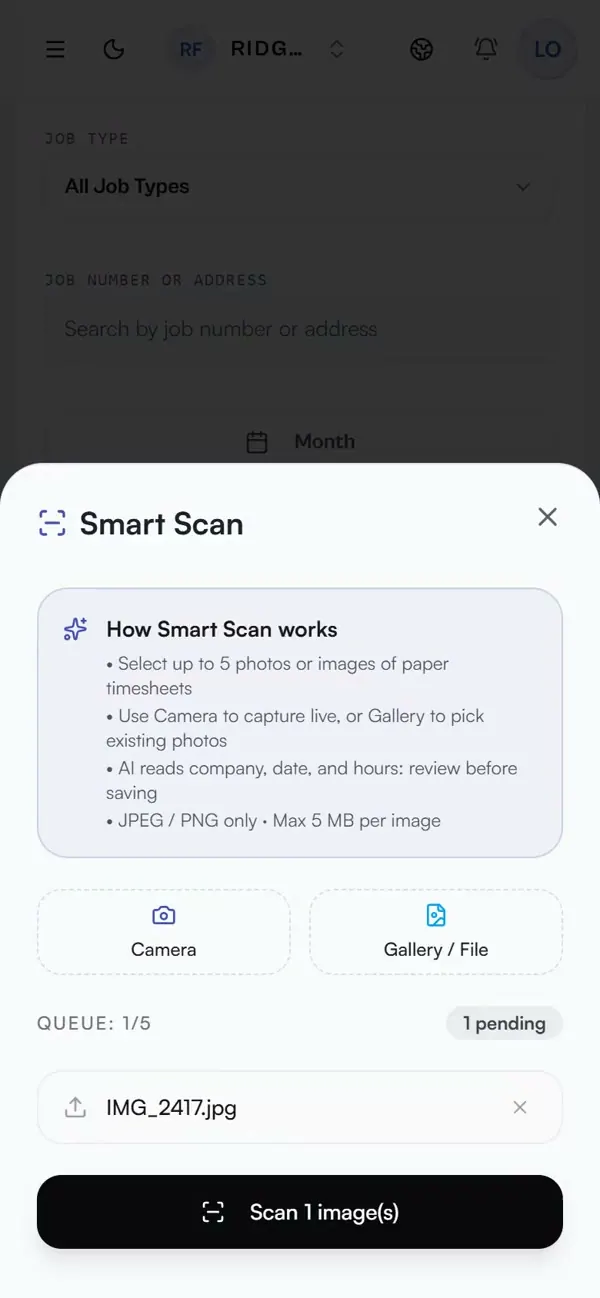
Real app, demo data
From photo to draft entry
Snap up to five sheets with the camera or pick JPEG or PNG files. Smart Scan reads the date, company, time in and out, hours, kilometres, job number and notes into a draft.
You stay in control
Every draft is reviewed before it is saved. Nothing enters payroll without your confirmation.
No dead-end spreadsheets
Standalone scanners stop at Excel. Here, the scanned entry becomes a real timesheet that approvals, payroll totals, and invoices can use.
Keeps the paper habit
Crews that like paper keep paper. The office stops re-typing it.
How it works in practice: what happens when the handwriting is a mess
Consider the awkward case: a crew that insists on paper, and handwriting that's half-legible.
The worker snaps a photo of the paper timesheet they already filled in, or uploads a JPEG/PNG. Smart Scan's OCR reads it and drafts a real timesheet entry: date, times, hours, job number and notes.
Handwriting gets messy. Smart Scan fills the fields it can read and leaves the unclear ones for a person to complete. Every draft must be reviewed and confirmed before it is saved or reaches payroll.
The confirmed entry does not end as a spreadsheet row. It becomes a timesheet that approvals, payroll totals, and client invoices can use without another round of typing. The crew keeps the paper while the office stops keying it in again.
What operators ask before they switch.
How does the paper timesheet scanner work?
Take a photo of the paper timesheet from your phone or upload a JPEG or PNG. Smart Scan reads the date, times, hours and notes, then drafts an entry for you to review and save. Nothing is submitted without your confirmation.
Does it only convert to a spreadsheet?
No. Standalone OCR tools stop at an Excel file. In Daybill, the draft becomes a real timesheet, so approvals, payroll totals, and client invoices use the same data without another round of typing.
What about messy handwriting?
Smart Scan drafts what it can read and leaves the rest for you to fill in. You always review the draft before saving, so a bad read never becomes a bad paycheck.
Which plans include Smart Scan?
Smart Scan is included on Solo Pro, on Team and Expert with no monthly cap, and on Team Free with 25 scans a month. The free Solo plan covers manual timesheets, PDF invoicing, and payroll-ready CSV export.
Run your next week on Daybill.
Smart Scan AI timesheet entry is included on Team Free (25 scans a month), on Solo Pro (CAD $14.99/mo, or $12.99/mo billed $155.88/yr), and on Team (CAD $39/mo) and Expert with no monthly cap. Free Solo Operator (CAD $0) covers manual timesheets, PDF invoicing, and payroll CSV export, but not Smart Scan.
See how these features connect across the field crew management platform .