From logged hours to a paid invoice.
Professional PDF invoices generated from the same records that ran payroll. Bill the client, mark it paid, and export to QuickBooks Online when your books live there.
No credit card. Free plan stays free.

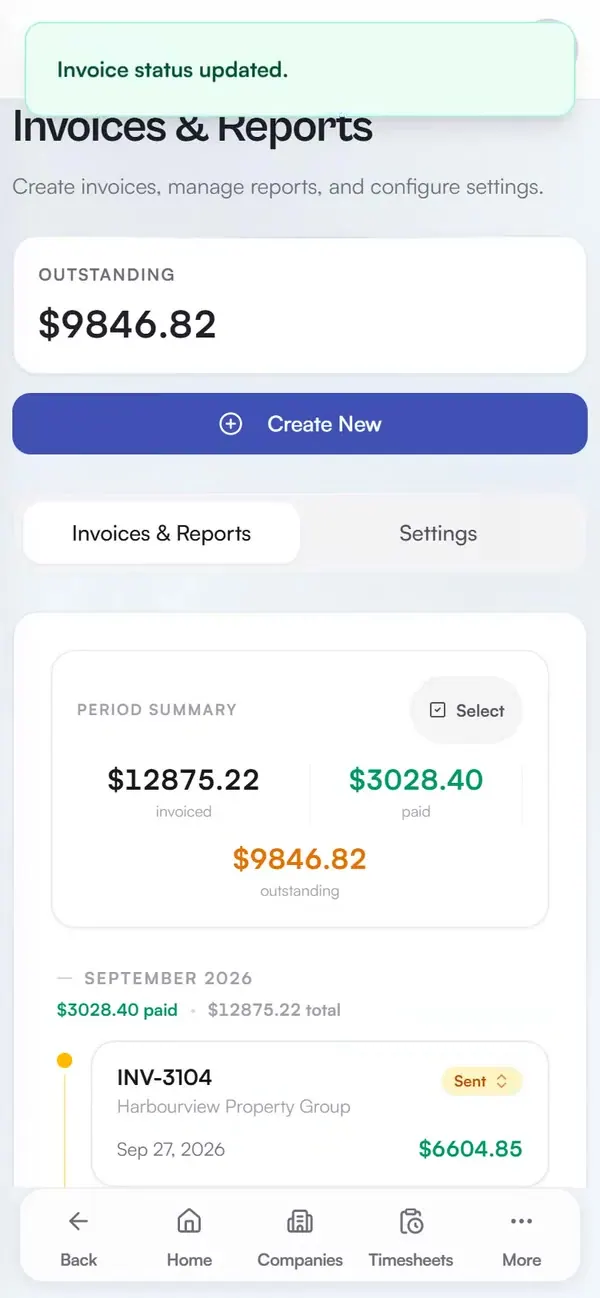
Real app, demo data
PDF invoices per company
Clean, professional PDFs built from the company's own records and charge rates, ready to send.
Review selected work before drafting
In a new standard Team invoice, authorized invoice managers can load selected unbilled work and review its readiness. Invoice details and the issuer remain a separate review before Save draft.
Paid means paid everywhere
Marking an invoice paid cascades to the underlying records, so nothing gets double-billed or lost.
Built on the same records
Use the same recorded work for payroll preparation and work-based invoices. Saved invoice details and pay records keep their own history.
How it works in practice: before Daybill vs. after Daybill
Before Daybill: the period ends and someone opens a blank invoice template. Hours come from one spreadsheet, travel is added by hand, and company rates must be looked up. A mistyped number or mismatched paid status can bill a client twice for the same week.
After Daybill: create a work-based invoice from existing records and client charge rates. In a new Team invoice, choose the client, work sources and dates, then load unbilled work. Invoice readiness explains that selection; it does not certify the whole period or save the invoice. Review the issuer and invoice details, then use Save draft. Mark Paid only to record payment already received. Fixed-price Project Billing follows its separate agreement and invoice flow.
What operators ask before they switch.
Do invoices pull my logged hours automatically?
Yes. An invoice is built from the same timesheet records you already logged: hours, job types, travel, and the company's charge rates. Nothing is re-typed.
Can invoices repeat on a schedule?
Yes. Recurring schedules are available on Solo Pro and Expert, including eligible Expert trial, grace-period and grandfathered access. They create Draft invoices by default from approved, unbilled timesheets or completed, uninvoiced shifts. Review invoices and pause schedules as needed. Scheduling does not send invoices or charge customers.
What happens when an invoice is paid?
Mark an invoice Paid to record a payment you have already received. Work-based invoices also update their linked work records; fixed-price project invoices keep their own agreement and invoice history. This does not collect money or pay employees.
How many companies can I bill?
Up to 5 companies on the free Solo plan, 20 on Solo Pro, and unlimited on Team and Expert. Each keeps its own rates, records, and invoice history.
Can I export invoices to QuickBooks Online?
Yes, on every plan. Select up to 100 invoices and download a CSV in QuickBooks Online's invoice import format for Canada or the US. Canadian files keep each line's tax rate so you can map it to your tax codes. The US import does not support sales tax, and invoices with discounts need manual entry. There is no account linking: download from Daybill, then import in QuickBooks Online.
Run your next week on Daybill.
Professional PDF invoicing is available on every plan. Solo Free supports up to 5 companies; Solo Pro supports up to 20. Team Free supports up to 5 companies; Team and Expert support unlimited companies. Standard invoices use your logged work. Fixed-price Project Billing is separate and requires Projects enabled, eligible financial access and an authorized invoice manager in a Team workspace.
See how these features connect across the field crew management platform .